
Pillo: Pill Reminder & Alarm
Pillo Health Inc.Medical
4.85.99K Reviews
- Version
- 0.6.24
- Installs
- 500.00K
- Age Rating
- Everyone
Screenshots

Our Review of Pillo: Pill Reminder & Alarm
 Analysis by Appyee
Keeping a medication routine straight can be harder than it sounds. A dose may fall during a commute, a busy workday, or a change in plans, and then I’m left trying to remember whether I already took it. Pill Reminder & Health Tracker is designed to make that daily routine easier to follow. I see its main appeal in turning medication times into a visible schedule rather than relying on memory alone.
It is a free medical app from Pillo Health Inc., with optional in-app purchases ranging from $2.00 to $47.99 per item. That makes it possible to try the basic app without paying upfront, while the price range signals that some extras may cost money. I would check the purchase details in the app before deciding whether any paid option is worthwhile; the free starting point is the clearest value for someone who simply wants to organize reminders.
What the free starting point is for
The app’s central job is practical: help me keep a medication schedule in one place and reduce the mental effort of remembering each dose. That is useful even before considering any additional health-tracking tools, because a clear routine can help me spot what is due and plan around it. It is not a substitute for a prescription, pharmacist, or clinician, but it can support the everyday habit of following the plan I have already been given.
For someone comparing it with a phone’s built-in alarm, the distinction is organization. A standard alarm can ring at a chosen time, but a medication tracker is intended to connect reminders with a medication routine. If I take several items at different times, keeping those prompts together can be easier than maintaining a row of unrelated alarms. The trade-off is that a dedicated app still needs careful setup and regular attention; it only helps if the schedule entered is accurate.
Where it can earn a place in a routine
I would find this kind of app most useful when a schedule has enough moving parts to make memory unreliable: for example, a morning dose before leaving home and another medication later in the day. A sensible setup is to enter the prescribed routine, check each time against the label or instructions from a health professional, and then make the reminder fit the real day rather than an ideal one. If the routine changes, I would update it promptly instead of assuming yesterday’s settings still apply.
There is also a useful distinction between remembering and deciding. A reminder can prompt me to check what is due, but it cannot safely decide whether I should take a dose late, double a missed dose, or change a schedule. Those questions belong with the medication instructions or a qualified professional. I would treat the app as a personal organizer, not as medical advice or a safety system.
Who should compare alternatives first
If I only take one medication at the same time every day, a simple alarm or calendar reminder may be enough and involve less setup. If I need an established clinical record, caregiver oversight, or a particular connection to another health service, I would compare the available options carefully rather than assume a reminder app covers those needs. The right choice depends less on how many features an app appears to offer and more on whether its actual workflow matches the routine I need to maintain.
For a caregiver helping another person, I would first consider who will enter and verify the schedule, who will respond to reminders, and whether the person taking the medication can use the phone comfortably. A shared routine can reduce confusion only when everyone understands which schedule is current. I would avoid treating a notification as proof that a dose was taken; the person’s own confirmation and the instructions for the medication still matter.
Getting Started
First things first, downloading the Pill Reminder & Health Tracker is a breeze. Whether you're on Android or iOS, the app is just a quick search away in your app store. Once installed, you're greeted with a clean and intuitive interface. The onboarding process is straightforward, guiding you through setting up your medication schedule in a few simple steps.
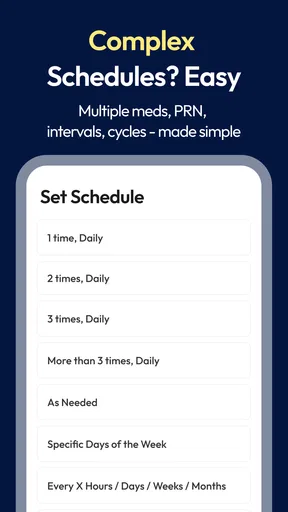
Inputting your meds is as easy as pie. You can add the medication name, dosage, frequency, and even select the shape and color of your pill from a variety of options. This visual aid is super handy, especially if you're juggling multiple meds.
Features That Stand Out
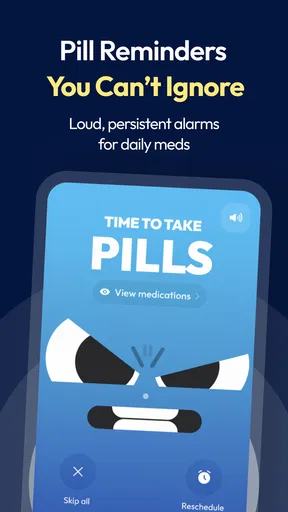
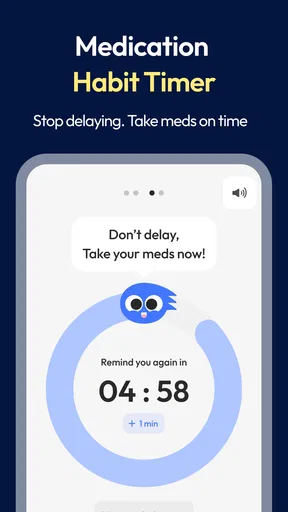
One of the first things I noticed is the app’s flexibility. You can set reminders for any time of day and adjust the frequency to match your prescription. If you miss a dose, the app nudges you with a gentle reminder, ensuring you stay on track.
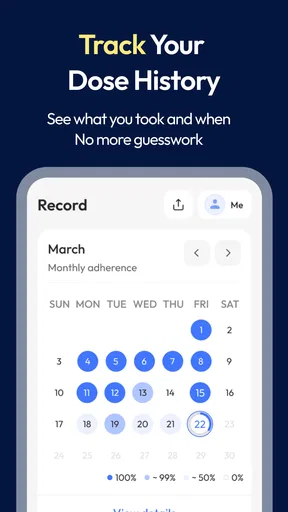
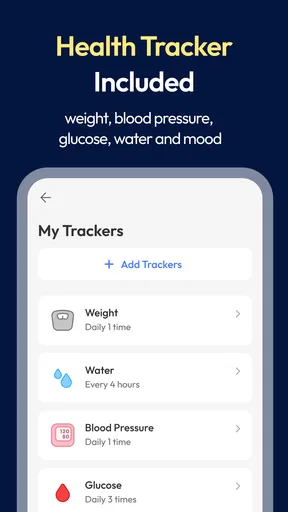
Beyond just pills, this app also lets you track supplements, ensuring your daily vitamin intake doesn’t slip through the cracks. The health tracker feature is another gem, allowing you to log symptoms, mood, and even your daily water intake. It’s like having a mini health diary right in your pocket.
Making the setup work for real life
One practical advantage of entering a medication’s appearance is that it can help me distinguish items when several are part of the same routine. I would treat the selected shape and color as a memory aid, not as identification: packaging and tablets can change, and the label remains the safer reference. A quick review of the list after setup is worthwhile, especially if medication names or schedules look similar.
For a changing day, I would place reminders at moments when I can realistically act on them, rather than choosing times that are convenient only on paper. A prompt during a meeting or while driving can be easy to dismiss and forget. Thinking through where I will be and what I will be doing at each scheduled time makes the reminders more useful. If a schedule varies by day, I would double-check that the entries reflect that pattern instead of forcing every day into one template.
The supplement and health-log options can also serve a different purpose from dose reminders. Logging a symptom or mood alongside a routine may help me notice what I want to discuss at an appointment, while a water note can make a daily habit easier to review. Those entries are most helpful when I keep them simple and consistent; trying to record every detail can turn a lightweight tracker into another chore.
Usability and User Experience
In terms of usability, the app is pretty much a home run. The interface is designed with the user in mind, focusing on ease of navigation. Even if you’re not tech-savvy, you’ll find it a breeze to set up and manage your reminders.
The notification system is unobtrusive but effective. You can customize the alert style, choosing between sound or vibration, so it fits seamlessly into your daily routine. Plus, the app syncs across devices, which is perfect if you switch between a phone and a tablet.
A realistic day with medication reminders
Imagine I have a morning routine at home and another scheduled dose later, when I am away from the kitchen where I keep my medication. I can enter the prescribed times, make sure the reminder is noticeable without being disruptive, and use the medication list to check what the prompt refers to. Before leaving, I can confirm that the schedule and the items I carry make sense for that day. The benefit is not that the app takes over the routine; it reduces the small memory checks that otherwise compete with everything else.
That workflow also shows a limitation: a reminder arriving at the right time does not guarantee the medicine is available or that I can take it then. Travel, work, and unexpected delays still require judgment and reference to the medication’s instructions. For medicines with special timing or handling requirements, I would not rely on a generic notification alone. The app can help me remember the plan, but the plan itself must come from the appropriate medical guidance.
When moving between devices, I would check that the schedule and notifications behave as expected on the device I actually carry. A feature such as syncing is only useful if the information remains current and the relevant alerts reach me. I would also avoid assuming that another person sees the same updates unless I have verified how the app is set up for that person.
Privacy and Security
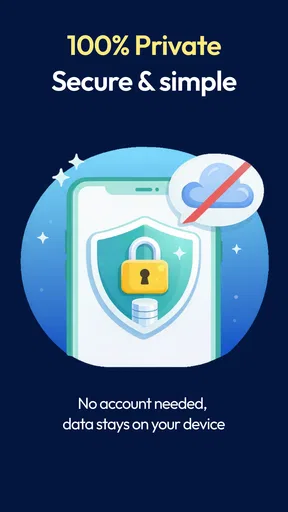
Your health data is personal, and the app respects that. It employs standard security measures to keep your information safe. You can even set up a password or use biometric authentication for an added layer of protection.
Because medication names and symptom notes are sensitive, I would use a lock option if other people sometimes handle my phone, and I would think carefully about what I choose to record. A short note that helps me remember a question for a clinician may be more useful than a detailed diary I do not want on the device. These are good everyday habits for any health app, not a reason to treat a phone as a medical record system.
Who Will Benefit Most?
This app is a lifesaver for anyone with a busy schedule or those managing multiple medications. Whether you’re a caregiver, a patient with chronic health issues, or just someone looking to keep tabs on your daily supplements, this app covers it all.
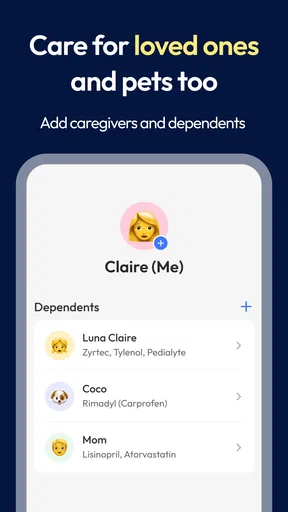
Parents will also appreciate the app for reminding kids to take their vitamins or medications. The multiple profile feature is great for families, as it allows you to manage everyone’s schedule in one place.
For a household using profiles, I would make the person’s name and schedule easy to distinguish, then have another adult review the entries before relying on them. That small check can prevent a well-meaning helper from confusing one family member’s routine with another’s. It is particularly relevant when a parent is managing a child’s schedule alongside their own, because a single phone can make separate routines feel deceptively similar.
On the other hand, I would skip this app if I expect it to verify that a medicine is appropriate, warn me about interactions, or replace a clinician’s instructions. It is also a poor fit if notifications are routinely silenced on my phone and I am unwilling to change that habit; a reminder that never reaches me adds little value. For a very simple schedule, a built-in alarm may be faster. For more complex care coordination, I would look for a tool whose capabilities specifically match the people and records involved.
Room for Improvement
While the app does a stellar job overall, there’s always room for improvement. I'd love to see integration with wearable devices in future updates, allowing for even more seamless health tracking. Additionally, a community feature for sharing tips and experiences with other users could add a social dimension to the app.
Another potential enhancement could be a medication database that suggests interactions or side effects to watch out for, making it a comprehensive tool for health management.
Those wishes point to an important boundary in how I would use it today: logging a medication is not the same as checking whether it is safe alongside another one. I would ask a pharmacist or clinician about interactions and side effects instead of expecting a tracker to catch them. Likewise, I would not choose an app on the assumption that it connects to a wearable or provides a clinical review; I would choose it for the routine-management role it actually serves.
How much value the app offers
The app is free to download, and its 4.7 average from around 14,000 ratings suggests that many users find it useful. It has passed 100,000 installs, while about 4,600 reviews give prospective users a substantial body of feedback to consider. I would treat those figures as context rather than a promise that it will suit every schedule: a medication reminder is only as useful as its setup and the user’s notification habits.
It is rated for everyone, and the current version is 0.5.55, with Android 6.0 or later required. Those details help with basic device and household suitability, but they do not tell me whether a particular phone’s alert settings are configured well. After installing, I would test a reminder at a convenient time and confirm that it appears and sounds or vibrates as intended before depending on it for a routine dose.
The paid-item range is broad, so I would not assume that every useful function is included at no cost or that every purchase is necessary. If the free setup already handles my schedule, I can keep using it without paying for an extra. If I encounter a locked feature that matters to me, I would compare its specific price and purpose with a simpler alternative before buying. The value is strongest when the basic reminders and tracking fit my needs without turning the app into an expense I did not plan for.
Overall, I would recommend trying Pill Reminder & Health Tracker if I wanted medication prompts plus a place to keep a lightweight health log. It makes the most sense for people whose routines are easy to lose track of, and for caregivers who can carefully maintain separate schedules. I would choose a simpler alarm for one unchanging daily dose, and a more specialized service if I needed clinical decision support or coordinated care. For me, its best value is modest but real: it can make a routine easier to see and follow, while leaving medical decisions where they belong.
Verdict
Strengths of Pillo: Pill Reminder & Alarm
- User-friendly interface for easy navigation.
- Customizable reminders to suit personal needs.
- Integration with health tracking apps.
- Supports multiple user profiles.
- Sends alerts for missed doses.
Limitations of Pillo: Pill Reminder & Alarm
- Limited features in the free version.
- Requires internet for some functionalities.
- Occasional sync issues with other apps.
- No option for dark mode interface.
- Advertisements in free version can be intrusive.
Similar Picks in This Category
View All
WebMD: Symptom Checker
WebMD, LLC4.1

Microphone Amplifier
DOSA Apps4.2

Anatomy Learning - 3D Anatomy
3D Medical OU4.5

Period Tracker and Calendar
SimpleInnovation4.9

GoodRx: Prescription Coupons
GoodRx4.8

CVS Health
CVS Pharmacy4.5
Frequently Asked Questions
What features does the Pill Reminder & Health Tracker app offer?
The Pill Reminder & Health Tracker app offers a variety of features designed to help manage your medication schedule and overall health. Key features include personalized medication reminders, health tracking for various metrics like blood pressure and weight, and the ability to set up notifications for upcoming doctor appointments. The app also provides a comprehensive medication database for easy logging.
Is the Pill Reminder & Health Tracker app user-friendly for seniors?
Yes, the app is designed with a simple and intuitive interface, making it user-friendly for seniors. It features large buttons, clear instructions, and a straightforward navigation system, ensuring that users of all ages can easily set up and manage their medication schedules and health tracking without confusion.
Can I use the app to track multiple family members?
The app allows users to manage multiple profiles, making it ideal for tracking the health and medication schedules of family members. You can create separate profiles for each person, ensuring that reminders and health data are organized and easily accessible, all from a single device.
Is my personal health data secure in the app?
Yes, the Pill Reminder & Health Tracker app prioritizes user privacy and data security. It employs robust encryption methods to safeguard your personal health information, ensuring that your data is protected from unauthorized access. Additionally, the app complies with relevant data protection regulations to maintain user trust.
Does the app require an internet connection to function?
The app primarily functions offline, allowing users to access medication schedules and health tracking features without an internet connection. However, some features, like downloading updates or backing up data to the cloud, may require internet access. This ensures that key functionalities remain available even when offline.
